For creators

Bring your series to Arc

Publish vertical episodes the way television works: seasons, episodes, and a real catalog. Apply from the app, upload straight from your camera roll, and earn from the creator fund by watch time.
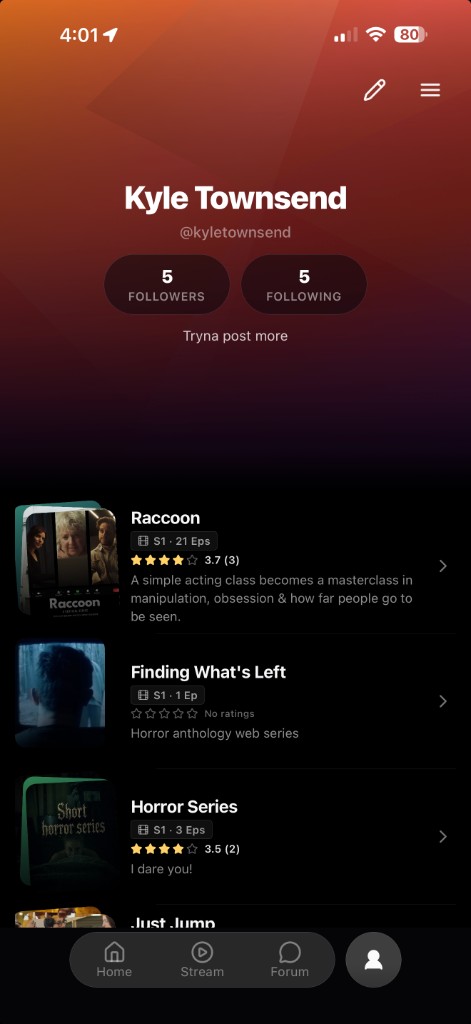
A creator profile on Arc

Why create on Arc

How it works

Built like TV

Organize phone-shot work into seasons and episodes. Arc treats your series like a show, not a one-off clip.

Get discovered

Editorial rows on Home and Today's Pick, plus a forum for every series, put your work in front of new viewers.

Earn from watch time

A shared creator fund pays out by the real watch time your videos earn. Connect Stripe and track every cycle in Rewards.

Own your profile

A public creator profile collects your seasons, episodes, ratings, and followers in one place.

How onboarding works

From download to your first published episode. Everything for creators happens inside the Arc iOS app.

Get the app

Creator onboarding

Six steps to your first series

You apply, the Arc team reviews, and approved creators can upload and organize work into seasons and episodes.

  1. Download Arc on iOS Install the app and create your account. Everything for creators starts here.
  2. Apply to create Open your Profile and choose Become a creator. Tell us about your work and submit your application.
  3. Get approved A member of the Arc team reviews every new creator. Approved accounts unlock uploading and a public profile.
  4. Upload from your camera roll Add videos straight from your phone. Assign each one to a series with a title, genre, and season and episode order.
  5. Submit for review We transcode to HD, run content checks, and publish approved episodes to Discover and the web catalog.
  6. Grow and earn Connect Stripe once, track pending and paid cycles in Rewards, and get paid from the creator fund by watch time.
Download Arc on iOS

What you earn

Arc pays creators from a shared fund, split by the watch time your videos earn.

Browse the catalog
  • Shared creator fund Earnings come from a fund split across creators by the real watch time on your videos.
  • Paid through Stripe Connect your account once in Profile. Payouts run on a regular schedule.
  • Track every cycle See pending and paid amounts in the Rewards section inside the app.
  • Keep your audience Series forums and followers keep viewers coming back to your work.

What you need

A short list. If you make original vertical video, you can apply today.

Read the guidelines

Device

iPhone on iOS

Apply and upload from the Arc iOS app.

Your work

Original video

Content you made or have the rights to publish.

Format

Shot for phone

Vertical clips organized into seasons and episodes.

Payouts

Stripe account

Connect Stripe to receive creator fund payouts.

Start creating

Download Arc, open your Profile, and apply. We review new creators and unlock uploading once you are approved.

  • After you apply A member of the Arc team reviews every new creator before uploading unlocks.
  • Once approved Uploading unlocks in the app, along with your public creator profile.
  • When you publish Episodes go live on Discover and the web catalog, and start earning watch time.

Get the app

Arc is free on the App Store. Download it, then apply from your Profile to start uploading once you are approved.

Download on iOS

Talk to us

Have a question before you start? Email the team and we will help you get set up as a creator.

Email support